.png?width=202&height=60&name=Fishbowl%20by%20GoTab%20Logo%20(1).png)
What are email safe or web safe fonts?
Email-safe fonts are reader-friendly and visually consistent across email provider platforms. It is crucial to choose appropriate fonts for your emails to effectively convey your brand's tone and message.
Considering that people typically spend only 10 to 12 seconds reading or scanning a business email, typography plays a significant role in email design. Alongside a captivating subject line and visuals, font selection greatly impacts your email's effectiveness in attracting new clients and improving conversion rates.
To optimize your company emails and email marketing campaigns, opt for font styles and sizes that enhance your brand's image. Ensure that your email fonts align with your brand's design and tone, are visually appealing, easy to read, and entice readers to engage with your content. By prioritizing these factors, you can choose the best fonts for your emails.
The two primary font styles
The two main types of font to consider for your email content are serif and sans serif. Serif font designs include a small serif or tail at the end of each character. The most frequently used different fonts of this type are Times New Roman and Georgia. Sans-serif fonts do not have tails on their characters. The most common fonts of this type in use today are Arial and Helvetica.
10 email-safe fonts for major email providers:
- Arial
- Helvetica
- Times New Roman
- Georgia
- Tahoma
- Verdana
- Courier New
- Palatino
- Futura
- Calibra
Best font size for email
Choose an appropriate email font size that is neither too large nor too small. While there are no set standard recommendations for headline or body text sizes, aim for a range between 10 and 16 points. Extremely large fonts can overwhelm email content and appear distorted on certain platforms.
If your chosen font size is too small, recipients, including clients and potential customers, may skip reading your message. This can be problematic, particularly in transactional emails. To ensure quality and readability, send test emails to yourself before sending to a larger group. This is especially important for marketing campaigns or when sending a significant number of sales announcements. Through testing, you can determine the optimal font size for your emails.
Make your emails stand out
The font style and size you use greatly impact the success of your email marketing. Your customers' perception of your brand, products, and services is influenced by how they react to your email presentation. The quality of your message content can either boost or hinder your brand promotion.
To create impactful email marketing messages, use a clear and attractive font style and size, along with a streamlined color scheme and design. Companies of all sizes respond best to well-designed messages that are easy to read. Focus on these two tips to achieve greater success for your brand.
Fishbowl’s Google Font suggestions
Sans-Serif FontsOpen SansOpen Sans is a great choice for minimalist business designs. With a variety of different styles available, there is something for everyone. Use the "Light" style for a modern, stylish feel in your meeting minutes, or go all out and define key points with "Bold" or "Extrabold." RobotoSimilar to Open Sans, Roboto is a very simple all-rounder. This clear, easy-to-read font style is perfect for the main text of your newsletter and still makes a change from the likes of Arial and Times New Roman. Because this is such a simple typeface, it is easy to pair with another, more unique font (e.g. your logo or typical brand font) without appearing to clash or be distracting. MontserratAnother highly popular Google font, Montserrat brings a bit more attitude to your design. This font choice would work extremely well as a CTA for your email newsletter. Noto SansNoto Sans is an unmodulated (“sans serif”) design for texts in the Latin, Cyrillic, and Greek scripts, which is also suitable as the complementary choice for other script-specific Noto Sans fonts. It has italic styles, multiple weights and widths, and 3,741 glyphs. |
Serif FontsPlayfair DisplayA slightly more interesting choice, Playfair Display is an elegant, serif typeface, well-suited to announcements, updates, or company news. Give this font a go in your shareholders' newsletter or your monthly round-up. Source Serif ProSource Serif Pro is a serif typeface in the transitional style. It is available in six weights in upright styles and italics,[5] and five optical sizes.[6] It is also available as a variable font with continuous weights from 200 to 900. DM Serif DisplayDM Serif Display is a high-contrast transitional face. With delicate serifs and fine detailing, the design has been shaped for use in super-sized poster settings. It is accompanied by DM Serif Text, for use in smaller point ranges. Noto SerifNoto is a global font collection for writing in all modern and ancient languages. Noto Serif is a modulated (“serif”) design for texts in the Latin, Cyrillic and Greek scripts, also suitable as the complementary font for other script-specific Noto Serif fonts. It has italic styles, multiple weights and widths, and 3,256 glyphs. |
Adding Google Fonts to your email messaging
Google Fonts is a free web font service. You can embed the fonts via an URL or download the web fonts if you’re mocking up designs on your local machine with design software. Google Font licenses allow you to use them in your emails. Below, we’ll talk more about how you can embed Google Fonts in your email with the method.
It’s important to mention that, for whatever reason, most Google fonts (and other web fonts) won’t display in Gmail. Seems strange, right? It is what it is.
Now that we know where to find web fonts, let’s talk about three different ways to embed web fonts in your HTML email template:
-
-
-
-
-
-
-
- @import
- <link>
- @font-face
-
-
-
-
-
-
We’ll dig into each of these below and why you might want to choose each method. In the following sections, we’ll talk about using web fonts in your emails and how to use a font stack to specify fallback fonts in case your web font doesn’t display in a particular email client. This is important because web fonts only work in a limited number of email clients.
How can I use the @import method to embed a web font?
The @import method defers the loading of the web font until your email’s HTML is fully loaded. In other words, your email will load first, and then your font will load after. This means your font may take a bit longer to appear. Here’s what email client support loos like for the @import method:
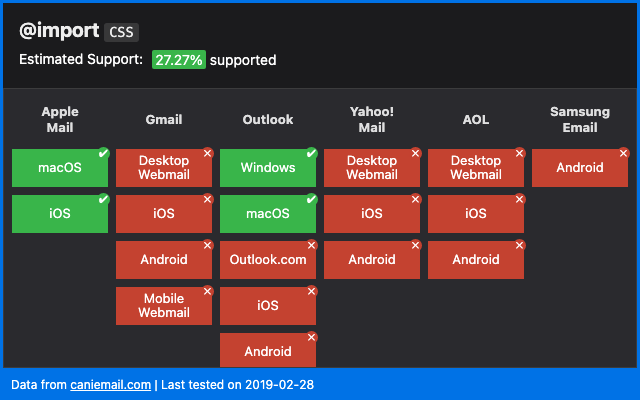
To use the @import method, we’ll first obtain the @import code from the web font service. Then, we’ll embed the method in the head of our HTML email template.
We’ll use Google Fonts for this example, but the procedure is similar for other web font services. To use the @import method:
- Navigate to your font on Google Fonts.
- Next to your font, click +Select this style.
- In the sidebar which pops up, click the radio button for @import, as shown below.
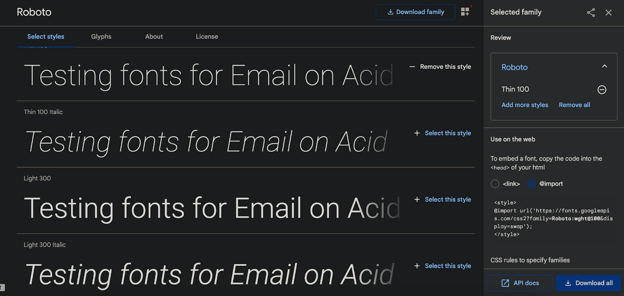
- Select and copy the code.
- Paste this code, including the